
Search Console, Read For You
Sixteen months of your own search data, the queries that rose and fell already identified, and five kinds of opportunity computed from numbers Google measured rather than from a benchmark somebody invented.
Requires Google Search Console, which is optional and free to connect. Everything else in the product works without it.
- 16 months
- History on first read
- 5
- Kinds of opportunity
- Daily
- Refreshed
- Always
- Tokens encrypted at rest
Search Console Has The Answer And Will Not Volunteer It
Search Console is the most honest data any website has about itself, and using it well means exporting sixteen months, pivoting it, and comparing periods by hand. Most teams look at the last 28 days, notice clicks are down, and stop there.
The interesting questions are all comparative. Which queries moved. Which pages are getting impressions they never convert into clicks. Where the site sits on page two for something it nearly ranks for. None of those are on a default screen.
- A monthly screenshot of the clicks chart, and no idea which queries caused the shape
- Pages with thousands of impressions and a click-through rate nobody has looked at
- Two of your own pages taking turns for the same search, invisible from your own website
- Sixteen months of history you have never once read past day 28
The First Read Is Everything Google Has
Connecting with Google takes one OAuth grant. The first read covers sixteen months, everything Search Console keeps, taken a month at a time so no single request grows with the window. It is lag-aware: the page states the range it actually read rather than implying it is current to today.
After that a daily refresh re-reads the last ten days, because that is the part Google still revises. The rest is stored and final. Refresh tokens are encrypted at rest, and each provider derives its own key, so one provider's ciphertext is not a key to another's.
The opportunities are the point. They are grouped into five kinds and every one is arithmetic over measured numbers, which is why the click-through test stops at the first page of results instead of telling a query sitting at position 65 to rewrite its title.
The figures
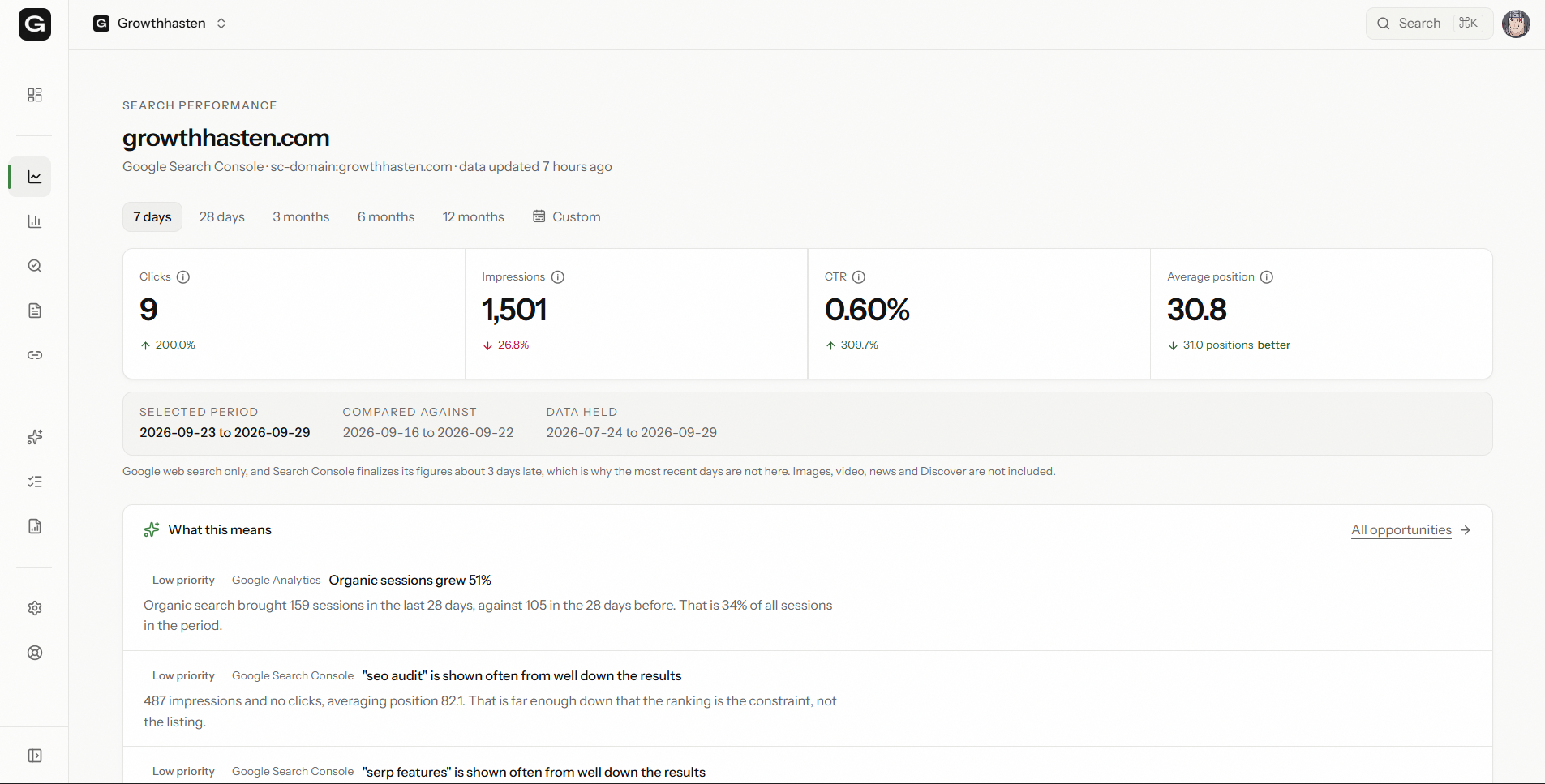
- Clicks, impressions, click-through rate and average position, against the previous period
- A daily trend chart with a range picker
- Top queries and top pages, sortable, searchable and paginated
- Country and device breakdowns
- Position spread: how your queries distribute across the results
What moved
- The queries that rose and the queries that fell between two periods
- Which pages appear for which searches over 90 days, replaced on every sync
- The comparison that Competing Pages and search-based link text both read from
Five kinds of opportunity
- Click-through: ranking well, being ignored
- Ranking: close enough to the first page to be worth the push
- Visibility: impressions without the position to convert them
- Emerging: queries that were not there last period
- Declining: queries going the other way, before the traffic does
What You Get, And What It Will Not Do
What you get
- Nobody on the team needs to open Search Console for everyday analysis
- The queries that moved are named, not hunted for
- Opportunities that survive a check, because they are computed from measured numbers
- Sixteen months of context behind every judgement about a page
What it will not do
- It is optional. Unconnected, it is an empty state explaining what connecting unlocks, and everything else in the product keeps working.
- It reports the range Google actually returned, including the lag, rather than implying today's numbers exist.
- It does not estimate, model or fill gaps in Search Console data.
About Search Performance
Do I have to connect Search Console?
No. The product works without it: the audit, the content inventory and the link analysis all run on the crawl alone. Search Performance is an empty state until you connect, and it explains what connecting unlocks rather than pretending to have data.
What happens to my Google tokens?
Refresh tokens are encrypted at rest under a dedicated key, and each provider derives its own key from it, so one provider's ciphertext is not a key to another's. You can disconnect from Settings at any time, and revoking access in your Google account is reflected in the connection's state rather than leaving a dead Disconnect button.
How far back does it read?
Sixteen months on the first sync, which is everything Search Console keeps. It is read a month at a time so the request never grows with the window, and after that a daily refresh re-reads the last ten days, which is the part Google still revises.
Why do the totals not match the sum of the rows?
Because Search Console counts anonymised queries in the totals and omits them from grouped rows. That is Google's behaviour, not a bug, and the product does not reconcile the difference by inventing rows to cover it.
It Does Not Work Alone
Every part of GrowthHasten reads the same project, which is what lets one of them know something another one found.
Free To Start
Run Search Performance On Your Website
Sign up with your domain and the first analysis starts before the redirect finishes. Free plan: one website of up to 900 pages, and three re-analyses. No card, no trial clock.